
🌐 What Actually Happens When You Type a Website URL?
You type a website address into your browser, press Enter, and within seconds the website appears.
It feels instant.
But behind that simple action, several technologies work together to deliver the webpage to you.
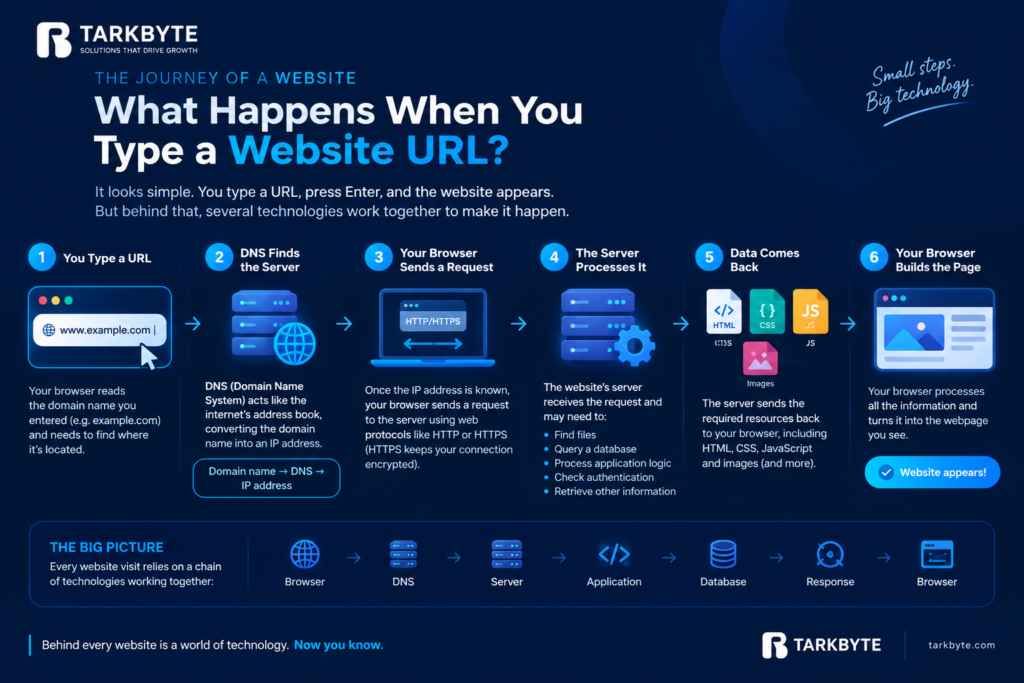
1. Your Browser Reads the URL
When you enter something like:
your browser first needs to understand where that website is located.
But a domain name isn’t the actual location of the server.
That’s where DNS comes in.
2. DNS Finds the Server
DNS stands for Domain Name System.
You can think of it as the internet’s address book.
It converts a human-friendly domain name into an IP address, which tells your browser where to find the website’s server.
Domain name → DNS → IP address
3. Your Browser Sends a Request
Once the browser knows where the website is hosted, it sends a request to that server.
Essentially, it’s asking:
“Can you send me this webpage?”
This communication happens using web protocols such as HTTP or HTTPS.
HTTPS also helps protect information exchanged between your browser and the website by encrypting the connection.
4. The Server Processes the Request
The website’s server receives the request.
Depending on the website, it may need to:
- Find files
- Query a database
- Process application logic
- Check authentication
- Retrieve other information
A simple static website may require very little processing, while a complex web application can involve several backend services and databases.
5. The Server Sends Data Back
The server then sends the requested resources back to your browser.
These can include:
HTML → Structure
CSS → Design
JavaScript → Interactions
Images → Visual content
6. Your Browser Builds the Page
Finally, your browser processes all of this information and turns it into the webpage you see.
That’s why you can go from:
Typing a URL → Seeing a webpage
in just a few seconds.
The Interesting Part?
Every time you visit a website, you’re relying on a chain of technologies working together:
Browser → DNS → Server → Application → Database → Response → Browser
If something in that chain is slow or unavailable, your experience can change.
That’s why things like DNS configuration, hosting, server performance, optimized code, databases, caching, and network speed can all influence how quickly a website loads.
Next time you open a website…
Remember that you’re not simply “opening a page.”
You’re triggering a conversation between your device and multiple systems across the internet.
Pretty impressive for a few seconds of loading, isn’t it? 🌐